Stream Chat Audience Analyzer
A downloadable tool
See who is actually participating in your stream chat.
Stream Chat Audience Analyzer is a fully local, single-file tool for analyzing exported stream comment logs.
Instead of only showing total comment counts, it reveals how chat activity is distributed across commenters and how strongly members and non-members participate.
Key metrics
- Total comments
- Unique commenters
- Member Rate — Comments
- Member Rate — Unique Users
- Member average comments per user
- Non-member average comments per user
- Engagement Density Ratio
- Peak Chat Window
- Paid Support Timeline
- Unique Paid Supporters
- Top Chat Windows
- Top Commenters
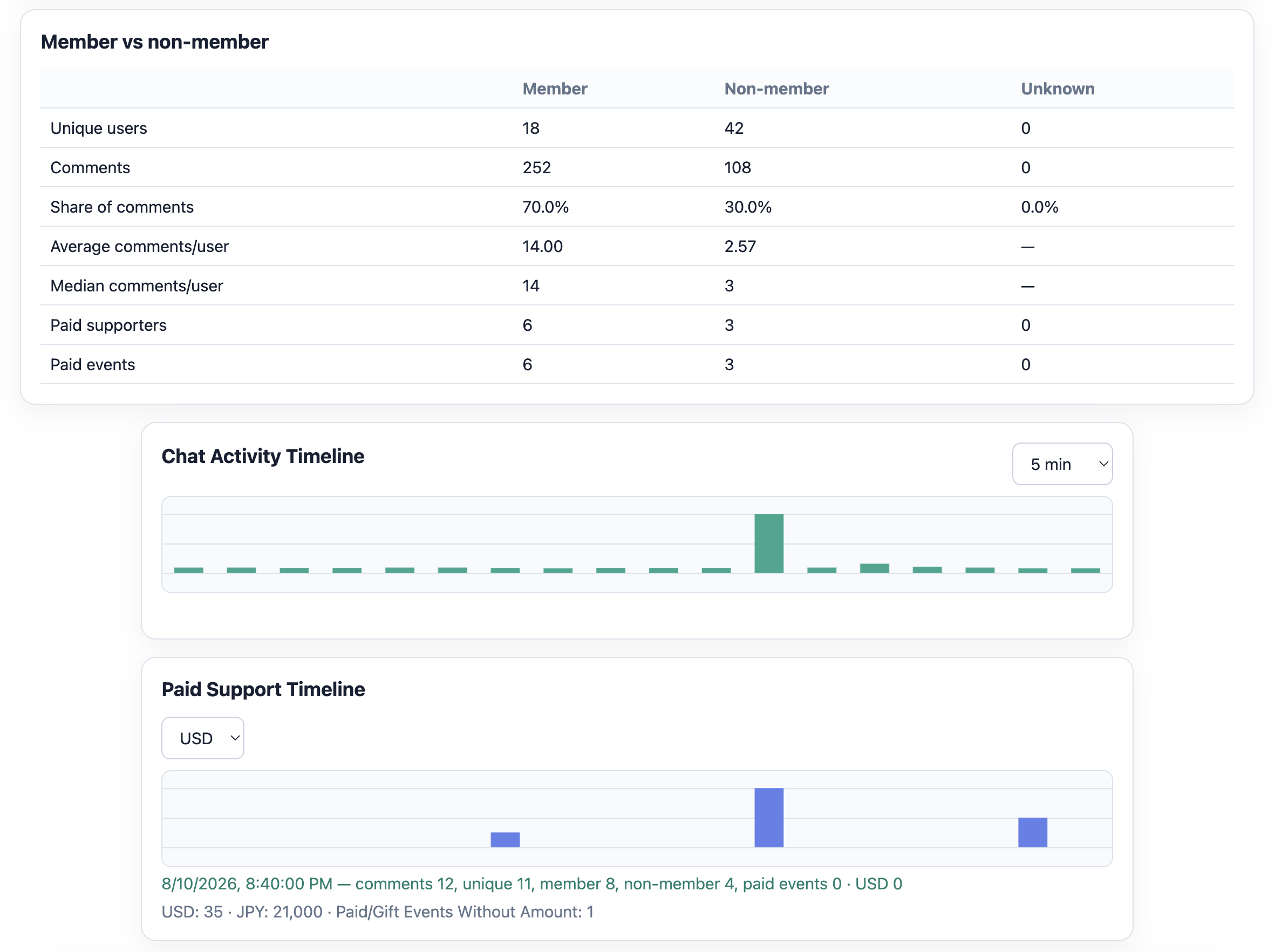
For example, a stream may show:
70% of comments from members
but only
30% of unique commenters are members.
That immediately shows that members are participating much more actively than non-members.
Timeline analysis
Switch between 1, 5, 10, and 30 minute windows to find when chat activity peaked.
Paid-support activity is also shown over time, with currencies kept separate.
Supported input
- Generic CSV
- JSON
- JSONL
- .log files
- Already-exported local OneComme-style JSONL logs
Completely local
- No server
- No upload
- No account
- No OAuth
- No API key
- No telemetry
- No cloud database
All analysis happens inside your browser. Your comment logs are never uploaded.
Exports
- Summary CSV
- User CSV
- JSON report
How to use
- Extract the ZIP.
- Open
Stream_Chat_Audience_Analyzer.htmlin Google Chrome. - Select your exported comment log.
- For CSV files, confirm the detected column mapping.
- Click Analyze.
- Review the dashboard and export reports if needed.
No installer or web server is required.
Important limitations
This tool does not fetch comments directly from YouTube URLs and does not use the YouTube API.
It does not perform AI sentiment analysis, cross-stream retention tracking, automatic currency conversion, comment moderation, or cloud synchronization.
Membership and paid-support results depend entirely on the information contained in the imported log.
Recommended environment
Current desktop Google Chrome.
Included files
- Stream_Chat_Audience_Analyzer.html
- README_EN.txt
- TERMS_OF_USE_EN.txt
- CHANGELOG.txt
Purchase
In order to download this tool you must purchase it at or above the minimum price of $9.99 USD. You will get access to the following files: